Wednesday, June 24, 2020

How to configure Transparent Data Encryption (TDE) in SQL Server

Introduction and Overview

Transparent Data Encryption (TDE) was introduced in SQL Server 2008. Its main purpose was to protect data by encrypting the physical files, both the data (mdf) and log (ldf) files (as opposed to the actual data stored within the database). Transparent Data Encryption Encrypts SQL Server, Azure SQL Databases, and Azure SQL Data Warehouse data files.
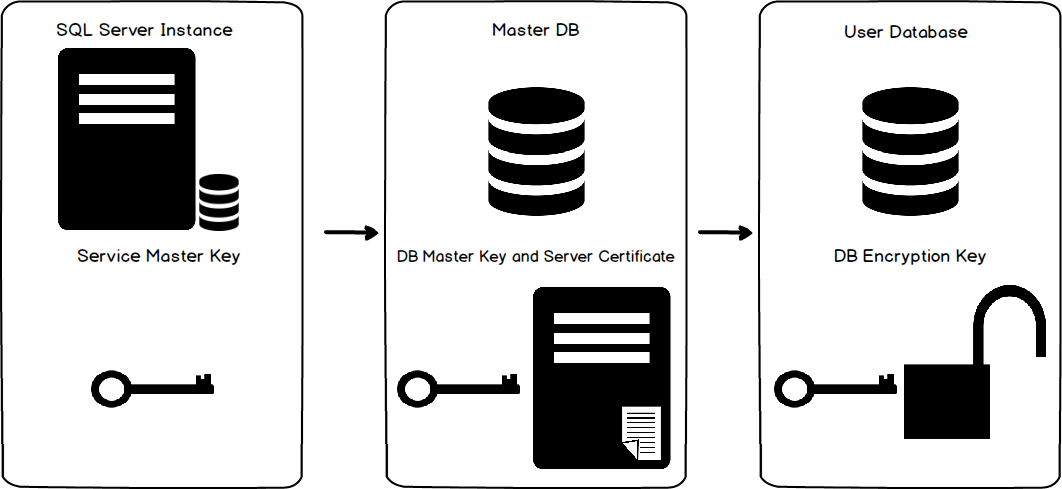
TDE overview
*This is a quick overview; a more detailed hierarchy will appear later in the article.
This technology was designed to have the entire encryption process be completely transparent to the applications accessing the database. It does this by using either Advanced Encryption Standard (AES), or Triple DES, encrypting the file pages and then decrypted as the information goes into memory. This inhibits limitations from querying the data in an encrypted database. This is essentially real time I/O encryption and decryption and does not increase the size of said database.
Also note, that as a result of Transparent Data Encryption, database backups will also be encrypted. In the event that a backup of the database gets lost or stolen, the culprit will not be able to restore the database without the appropriate certificate, keys and passwords.
Also, the TempDB database will be automatically encrypted. Since the tempdb is used by all user databases (processing/storing temporary objects). You shouldn’t notice much of a difference in how Transparent Data Encryption operates, but this is good to know and often overlooked. What good is an encrypted database if the data placed in TempDB isn’t encrypted?
However, this does not encrypt the data “across the wire” so to speak. If there is a requirement to encrypt data across the network an SSL connection must be implemented on the clients. (For more information regarding this please see this link)
If you’re a DBA there is a very strong chance that you are in charge of securing some very sensitive information.

Transparent Data Encryption Eligible SQL Server Editions

First we must determine the correct version of SQL Server that allows Transparent Data Encryption. I like to call it an expensive feature as it requires Enterprise Editions. It also works with Developer Edition, but of course, this is just for testing and development purposes. When implementing this in a production environment you must have the correct version of SQL Server. I’ve listed the eligible editions below.
  • SQL 2016 Evaluation, Developer, Enterprise
  • SQL 2014 Evaluation, Developer, Enterprise
  • SQL Server 2012 Evaluation, Developer, Enterprise
  • SQL Server 2008 R2 Datacenter, Evaluation, Developer, Enterprise, Datacenter
  • SQL Server 2008 Evaluation, Developer, Enterprise

Transparent Data Encryption Hierarchy

Now let’s have a quick overview of the Transparent Data Encryption architecture and hierarchy. First we have the Windows Operating System Level Data Protection API, which decrypts the Service Master Key found in the SQL Server instance level. The Server Master Key is created at the time of the initial SQL Server instance setup. From there we go the database level. The Service Master Key encrypts the database Master Key for the master database. The database master key creates a certificate in the master database. Keep in mind that you must create a backup of this certificate. Not only for environmental refreshes but disaster recovery purposes. Once Transparent Data Encryption is enabled on the database you won’t be able to restore or move it another server unless this same certificate has been installed. Keep good (and secure records) of the certificate and password.
The certificate is then used to enable encryption at the database level, thus creating the database encryption key.
To help visualize this process, please refer to the following diagram:
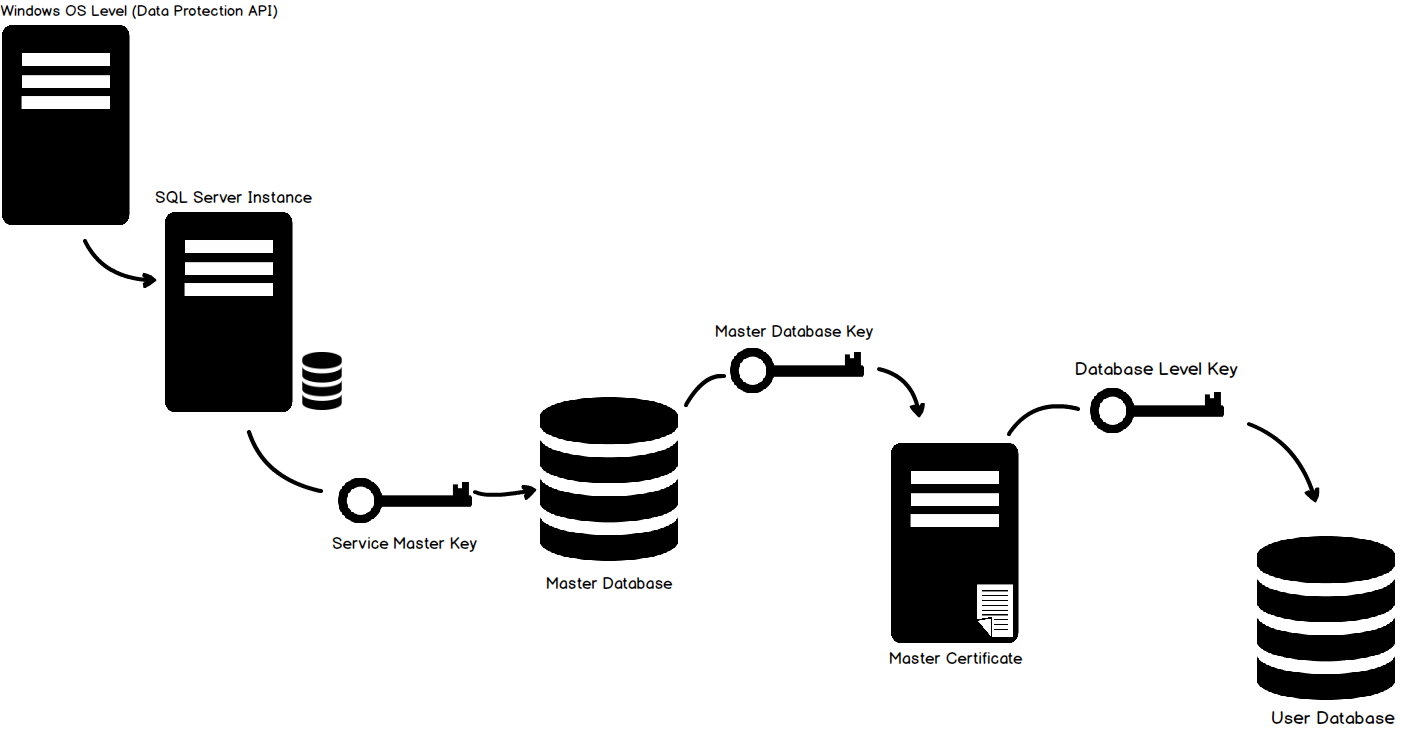
TDE hierarchy

Implementation

As always I like to do my work in SQL Server Management Studio. So please open up SSMS and log into the server that you will be using.
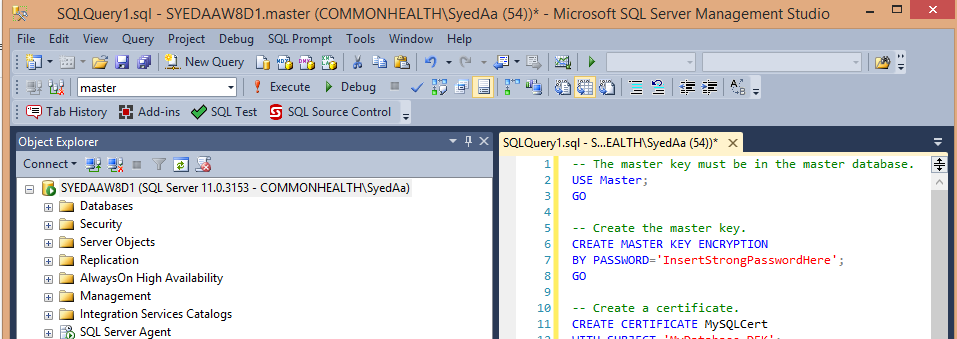
SSMS login to create a TDE master key

Create Master Key

We must first create the master key. It must be created in the master database, so as a precautionary measure I like to begin this statement with the USE MASTER command.

Create Certificate protected by master key

Once the master key is created along with the strong password (that you should remember or save in a secure location), we will go ahead and create the actual certificate.
The certificate’s name is “TDE_Cert” and I gave it a generic subject. Some Database Administrators like to put the name of the actual database that they are going to encrypt in there. It is totally up to you.

Create Database Encryption Key

Now, we must utilize our USE command to switch to the database that we wish to encrypt. Then we create a connection or association between the certificate that we just created and the actual database. Then we indicate the type of encryption algorithm we are going to use. In this case it will be AES_256 encryption.

Enable Encryption

Finally, we can enable encryption on our database by using the ALTER DATABASE command.
Once the encryption is turned on, depending on the size of the database, it may take some time to complete. You can monitor the status by querying the sys.dm_database_encryption_keys DMV.

Backup Certificate

It’s important to backup the certificate you created and store it in a secure location. If the server ever goes down and you need to restore it elsewhere, you will have to import the certificate to the server. In certain environments, the DR servers are already stood up and on warm/hot standby, so it’s a good idea to just preemptively import the saved certificate to these servers.
Remember to store the certificate in a safe and available locations (not a temporary one like this example).

Restoring a Certificate

In order to restore the certificate, you will once again have to create a service master key on the secondary server.
Once that is done, you must remember where you backed up the certificate and the encryption/decryption password.
Be mindful of the paths used in this example. You must specify the path that you have stored the certificate and private key. Also keep good and secure records of the encryption passwords.
Once the certificate is restored to the secondary server you may restore a copy of the encrypted database.

Some things to note before applying TDE. There are some drawbacks. Remember that Transparent Data Encryption encrypts the underlying database files including the backups. You can’t just take the files and dump them onto another SQL Server without the appropriate encryption keys and certificates. It does NOT allow for granular user level encryption. If that is the type of encryption you are looking for, you should investigate column level encryption.

Saturday, June 20, 2020

Comparison between Implicit conversion and Explicit conversion in SQL query


Implicit conversion

I have taken AdventureWorks2017 database for this below query demo.

In Implicit conversion, we are comparing a [AccounNumber] varchar() with a value, which is also a varchar and after running this query once with Actual execution plan and Statistics ON, we find the more CPU time used and execution plan shows warning. 

 SET STATISTICS TIME ON 

 SELECT per.FirstName, per.LastName, per.BusinessEntityID, cust.AccountNumber, cust.StoreID 
 FROM Sales.Customer cust
 INNER JOIN Person.Person per ON per.BusinessEntityID = cust.PersonID
 WHERE AccountNumber = N'AW00029594'
 GO

It shows more wired result when we run this query for 200 times, we found more CPU time and more execution time. approx more than 30 sec.

 SELECT per.FirstName, per.LastName, per.BusinessEntityID, cust.AccountNumber, cust.StoreID 
 FROM Sales.Customer cust
 INNER JOIN Person.Person per ON per.BusinessEntityID = cust.PersonID
 WHERE AccountNumber = N'AW00029594'
 GO 200

Explicit conversion 

Whereas in explicit conversion, It shows more nice result when we run this query for 200 times,  we found "0" CPU time and more execution time. approx less than 10 sec.

SET STATISTICS TIME ON 

 SELECT per.FirstName, per.LastName, per.BusinessEntityID, cust.AccountNumber, cust.StoreID 
 FROM Sales.Customer cust
 INNER JOIN Person.Person per ON per.BusinessEntityID = cust.PersonID
 WHERE AccountNumber = CONVERT(VARCHAR, N'AW00029594')
 GO 200

Conclusion: Try to avoid write query, which does implicit conversion. So, either compare value with same data type or convert it explicitly 

Friday, June 19, 2020

Find Poor Indexing for best performance tuning

10 Don’ts for Indexes – Poor Indexing Strategies
  1. Don’t index every column of the table.
  2. Don’t create more than 7 indexes per table (clustered and non-clustered)
  3. Don’t leave a table as Heap (create a clustered index).
  4. Don’t create an index on every column involved in every foreign key
  5. Don’t rebuild an index too frequently (monthly once is good enough)
  6. Don’t create an index with more than 5 to 7 key columns
  7. Don’t create an index with more than 5 to 7 included columns
  8. Don’t add your clustered index key in your non-clustered index
  9. Don’t change server fill factor, change it at an index level (as needed)
  10. Don’t ignore index maintenance

Missing Index Script:

The scripts is a good starting point. You should pay attention to Avg_Estimated_Impact when you are going to create an index. The index creation script is also provided in the last column.

-- Missing Index Script

SELECT TOP 25
dm_mid.database_id AS DatabaseID,
dm_migs.avg_user_impact*(dm_migs.user_seeks+dm_migs.user_scans) Avg_Estimated_Impact,
dm_migs.last_user_seek AS Last_User_Seek,
OBJECT_NAME(dm_mid.OBJECT_ID,dm_mid.database_id) AS [TableName],
'CREATE INDEX [IX_' + OBJECT_NAME(dm_mid.OBJECT_ID,dm_mid.database_id) + '_'
+ REPLACE(REPLACE(REPLACE(ISNULL(dm_mid.equality_columns,''),', ','_'),'[',''),']','')
+ CASE
WHEN dm_mid.equality_columns IS NOT NULL
AND dm_mid.inequality_columns IS NOT NULL THEN '_'
ELSE ''
END
+ REPLACE(REPLACE(REPLACE(ISNULL(dm_mid.inequality_columns,''),', ','_'),'[',''),']','')
+ ']'
+ ' ON ' + dm_mid.statement
+ ' (' + ISNULL (dm_mid.equality_columns,'')
+ CASE WHEN dm_mid.equality_columns IS NOT NULL AND dm_mid.inequality_columns
IS NOT NULL THEN ',' ELSE
'' END
+ ISNULL (dm_mid.inequality_columns, '')
+ ')'
+ ISNULL (' INCLUDE (' + dm_mid.included_columns + ')', '') AS Create_Statement
FROM sys.dm_db_missing_index_groups dm_mig
INNER JOIN sys.dm_db_missing_index_group_stats dm_migs
ON dm_migs.group_handle = dm_mig.index_group_handle
INNER JOIN sys.dm_db_missing_index_details dm_mid
ON dm_mig.index_handle = dm_mid.index_handle
WHERE dm_mid.database_ID = DB_ID()
ORDER BY Avg_Estimated_Impact DESC
GO

Unused Index script:

The scripts is a good starting point. You should pay attention to User Scan, User Lookup and User Update when you are going to drop the index. The generic understanding is if this value is all high and User Seek is low, the index needs tuning. The index drop script is also provided in the last column.

-- Unused Index Script

SELECT TOP 25
o.name AS ObjectName
, i.name AS IndexName
, i.index_id AS IndexID
, dm_ius.user_seeks AS UserSeek
, dm_ius.user_scans AS UserScans
, dm_ius.user_lookups AS UserLookups
, dm_ius.user_updates AS UserUpdates
, p.TableRows
, 'DROP INDEX ' + QUOTENAME(i.name)
+ ' ON ' + QUOTENAME(s.name) + '.'
+ QUOTENAME(OBJECT_NAME(dm_ius.OBJECT_ID)) AS 'drop statement'
FROM sys.dm_db_index_usage_stats dm_ius
INNER JOIN sys.indexes i ON i.index_id = dm_ius.index_id
AND dm_ius.OBJECT_ID = i.OBJECT_ID
INNER JOIN sys.objects o ON dm_ius.OBJECT_ID = o.OBJECT_ID
INNER JOIN sys.schemas s ON o.schema_id = s.schema_id
INNER JOIN (SELECT SUM(p.rows) TableRows, p.index_id, p.OBJECT_ID
FROM sys.partitions p GROUP BY p.index_id, p.OBJECT_ID) p
ON p.index_id = dm_ius.index_id AND dm_ius.OBJECT_ID = p.OBJECT_ID
WHERE OBJECTPROPERTY(dm_ius.OBJECT_ID,'IsUserTable') = 1
AND dm_ius.database_id = DB_ID()
AND i.type_desc = 'nonclustered'
AND i.is_primary_key = 0
AND i.is_unique_constraint = 0
ORDER BY (dm_ius.user_seeks + dm_ius.user_scans + dm_ius.user_lookups) ASC
GO

Wednesday, June 17, 2020

Unable to delete Log Shipping configuration


If you mistakenly delete the log shipping jobs, if you trying to reconfigure the log shipping for the same database again, and you are getting below error. 

The specified @job_id ('text') does not exist. (Microsoft SQL Server, Error: 14262) 

So here is the solution for your problem.


Run this below script in master databases.
Exec sp_delete_log_shipping_primary_secondary
@Primary_database = N'DATABASE_NAME'
,@secondary_server = N'SECONDARY_SERVER_NAME'
,@secondary_database = N'SECONDARY_DATABASE_NAME'
and to delete further all reference to that server.
also run this below stored procedure followed by
EXEC sp_delete_log_shipping_primary_database
@database = N'DATABASE_NAME'
you can get the list of backups taken from MSDB database using the following script:
DECLARE @db_name VARCHAR(100)
SELECT @db_name = 'Test_Data'

-- Get Backup History
SELECT TOP (100) s.database_name
,m.physical_device_name
,CAST(CAST(s.backup_size / 1000000 AS INT) AS VARCHAR(14)) + ' ' + 'MB' AS bkSize
,CAST(DATEDIFF(second, s.backup_start_date, s.backup_finish_date) AS VARCHAR(4)) + ' ' + 'Seconds' TimeTaken
,s.backup_start_date
,CAST(s.first_lsn AS VARCHAR(50)) AS first_lsn
,CAST(s.last_lsn AS VARCHAR(50)) AS last_lsn
,CASE s.[type] 
 WHEN 'D' THEN 'Full'
 WHEN 'I' THEN 'Differential'
 WHEN 'L' THEN 'Transaction Log'
 END AS BackupType
,s.server_name
,s.recovery_model
FROM msdb.dbo.backupset s
INNER JOIN msdb.dbo.backupmediafamily m ON s.media_set_id = m.media_set_id
WHERE s.database_name = @db_name
ORDER BY backup_start_date DESC, backup_finish_date

Tuesday, June 16, 2020

Forecast: Check the size of the backup file before Restore the Backup in SQL Server


If we have limited amount of the disk and not sure, what would happen if we try to restore backup which will eventually build a database larger than the available space.


Let us check, how much space will it contain on the drive with the help of the command 
RESTORE FILELISTONLY.
1
2
RESTORE FILELISTONLY
FROM DISK = N'E:\mydata\db_backup\test_DB.bak';

Once you run the command it will display the details of the MDF, LDF or any other file contained in the backup. Pay attention to the column Size. This column actually contains the size of the file in bytes once the backup is restored on the database.


How to Forecast the Size of Restore of Backup in SQL Server? - Interview Question of the Week #265 SizeofRestore
In our example, if you notice there are two different files MDF and LDF. The respective sizes in the bytes are as following:
  • MDF: 1216348160
  • LDF: 679477248
Now you can covert the same using the following formula:
  • 1 byte = 8 bits
  • 1 kilobyte (K / Kb) = 2^10 bytes = 1,024 bytes
  • 1 megabyte (M / MB) = 2^20 bytes = 1,048,576 bytes
  • 1 gigabyte (G / GB) = 2^30 bytes = 1,073,741,824 bytes
  • 1 terabyte (T / TB) = 2^40 bytes = 1,099,511,627,776 bytes
  • 1 petabyte (P / PB) = 2^50 bytes = 1,125,899,906,842,624 bytes
  • 1 exabyte (E / EB) = 2^60 bytes = 1,152,921,504,606,846,976 bytes
Or just use Google Calculator (which I do most of the time), which also displays the formula divide the digital storage value by 1e+9.
  • MDF: 1216348160 = 1.21 GB
  • LDF: 679477248 = 0.67 GB
Essentially, I will need around 2 GB of free space if I want to restore my backup. Well, that’s it, sometimes a complex looking problem of how to forecast the Size of Restore has a very simple solution.

Monday, June 15, 2020

T-SQL script to know "What is Stored in TempDB"


List of currently stored in their TempDb. If you run the following query you would get the detailed list.

SELECT tb.name AS [Temporary Object Name],
ps.row_count AS [# rows],
ps.used_page_count * 8 AS [Used space (KB)],
ps.reserved_page_count * 8 AS [Reserved space (KB)]
FROM tempdb.sys.partitions AS prt
INNER JOIN tempdb.sys.dm_db_partition_stats AS ps
ON prt.partition_id = ps.partition_id
AND prt.partition_number = ps.partition_number
INNER JOIN tempdb.sys.tables AS tb
ON ps.object_id = tb.object_id
ORDER BY tb.name

T-SQL Script to Check SQL Server Job History

Here is the script to fetch status of all running SQL jobs in SQL Server.

SELECT jobs.name AS 'JobName',
msdb.dbo.agent_datetime(run_date, run_time) AS 'Run Date Time',
history.run_duration AS 'Duration in Second'
FROM msdb.dbo.sysjobs jobs
INNER JOIN msdb.dbo.sysjobhistory history
ON jobs.job_id = history.job_id
WHERE jobs.enabled = 1